
Rebuilding our infrastructure from scratch and migrating live (AWS ECS migration)
It’s been a busy few months in which I was finally able to migrate our entire application to AWS from our current cloud provider. We were able to do this migration without any major disruptions for our customers and overall I’m pretty happy with how it went. In this article I wanted to take an in-depth look at how we did the migration.
This article is also available in video form if you prefer that:
How our infrastructure evolved over time
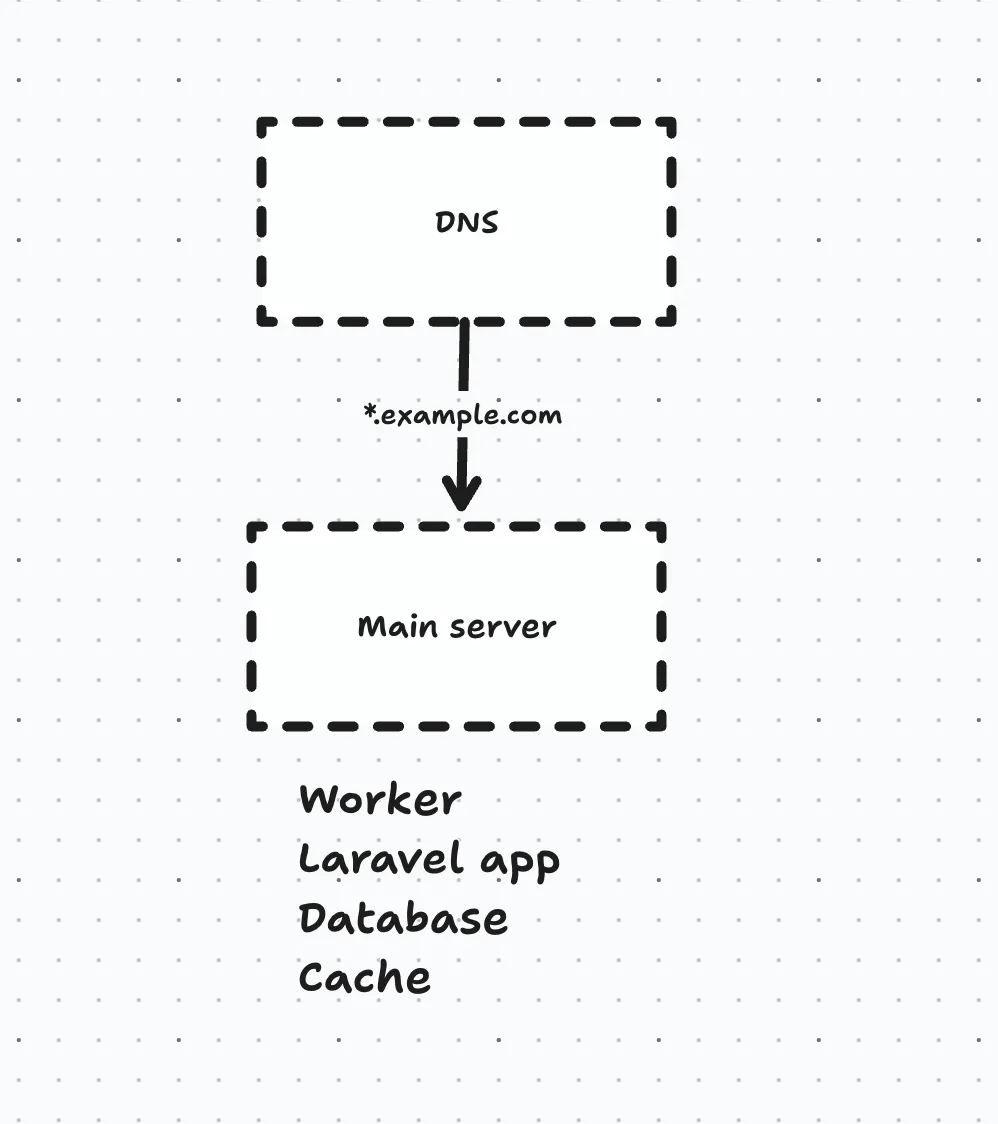
Initially, we had just a single server that had the application and the database on it, in addition to the worker, scheduler and Redis cache.
As we grew, this single point of failure had to be taken care of, so we split the application from the database server like this:
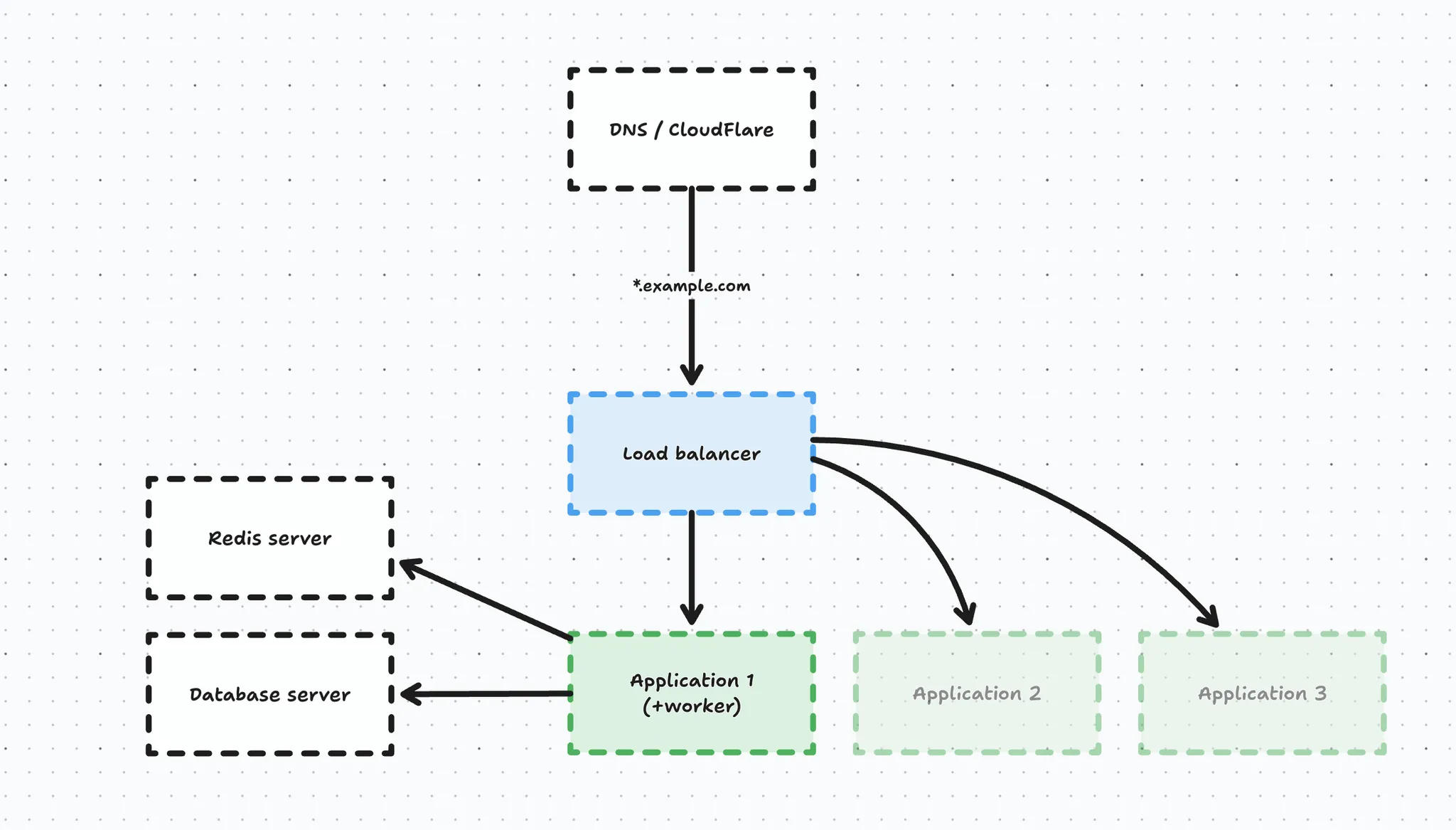
We converted our main server into a database server (to prevent database migration headaches) and we created a new application server with the queue worker and task scheduler on it. Before switching over the DNS, we introduced a load balancer so we could scale out our application servers horizontally in the future without worrying about DNS records. This entire setup was managed through Forge.
In this process we also migrated our DNS to CloudFlare and enabled the proxy.
Over time, we added a separate redis cache server, and a few extra application servers to handle load. In this process, our first application server kept being a bit special in the sense that it also had the scheduler and database queue workers on it, so it was not purely handling web traffic.
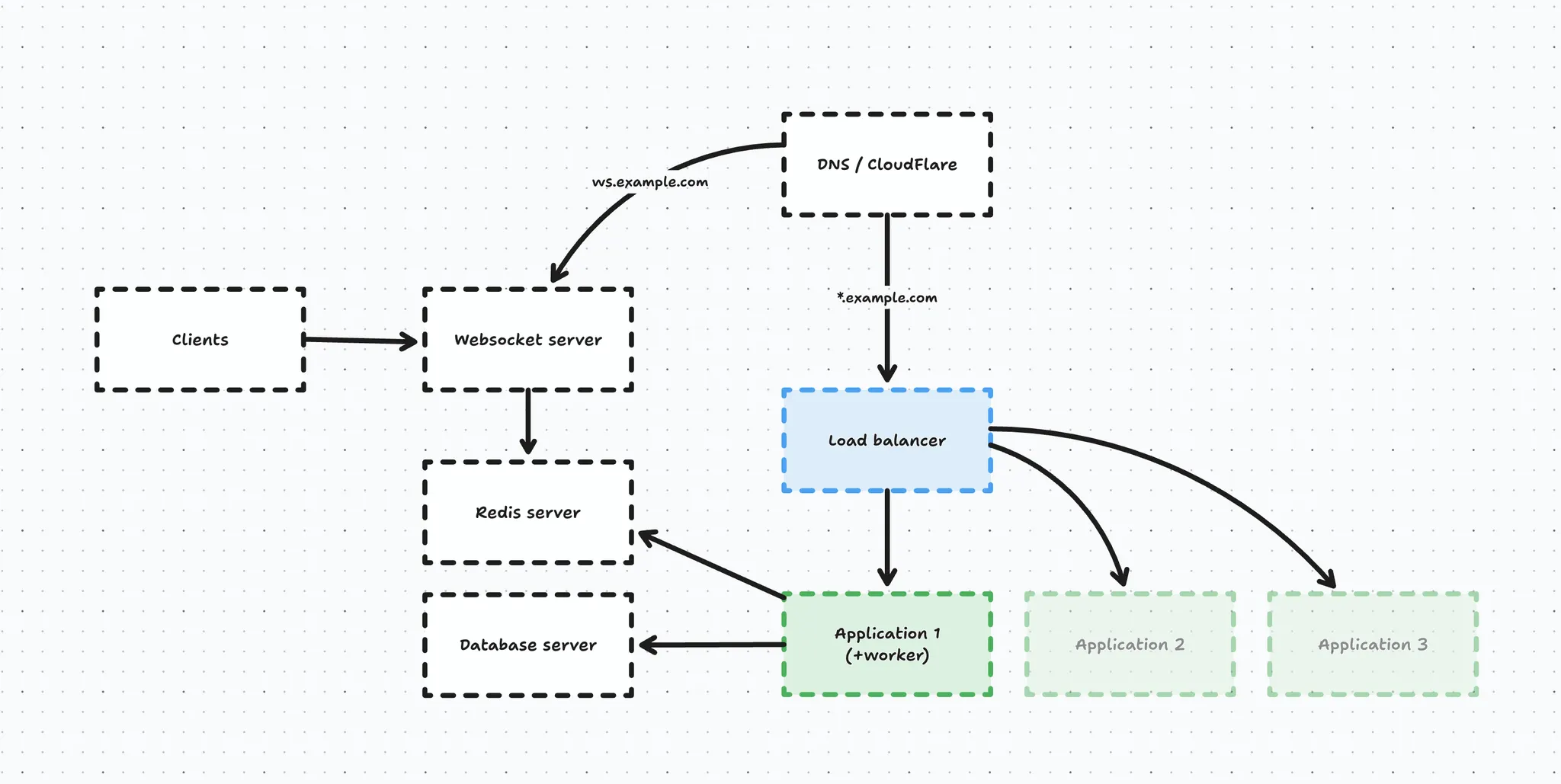
Next, we introduced our realtime websocket server using Laravel Echo and it connected to the same Redis instance as our application because we set up Redis as a broadcast driver.
Migrating the database to RDS
Our current server provider had been plagued with reliability issues, so earlier this year I decided to migrate our entire database to AWS. I have an entire article & video on that topic.
The RDS migration had the following impact on our infrastructure:
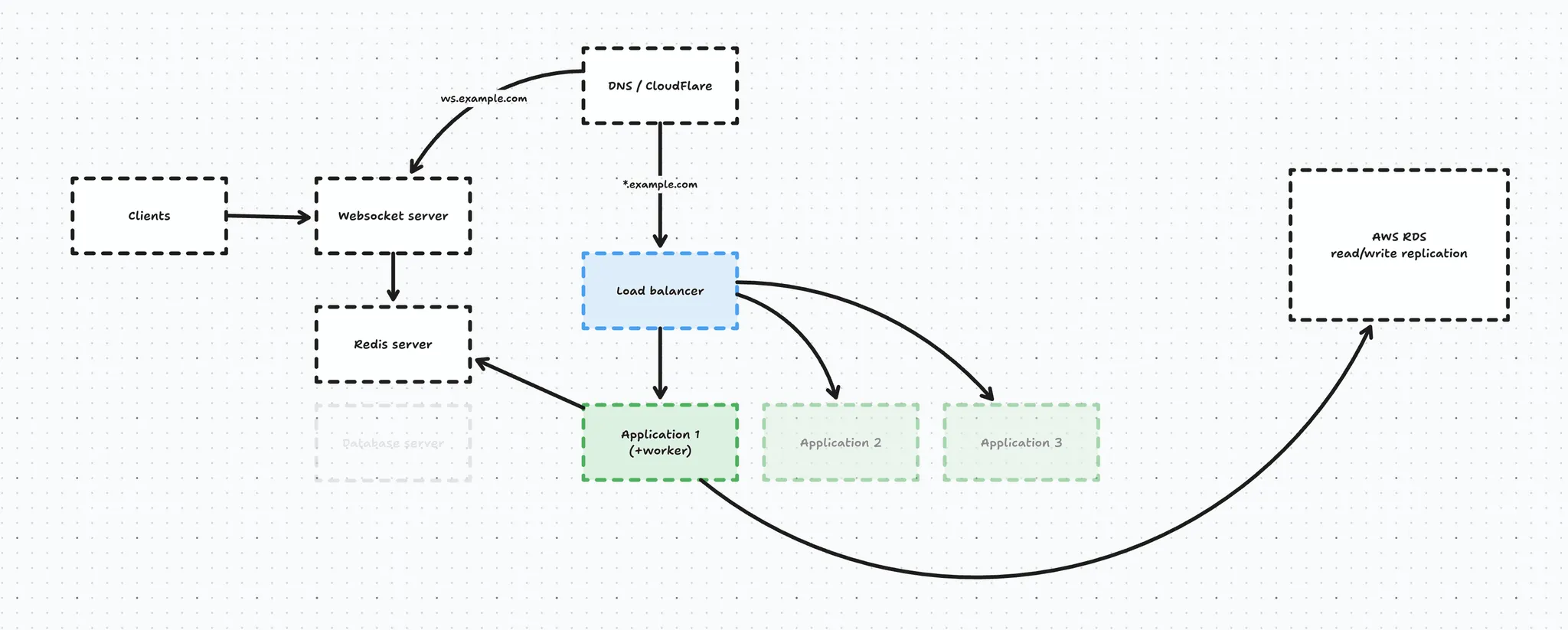
We deprecated our self-managed database server and migrated it to AWS RDS and in this process we introduced a read/write replica as well, for extra reliability and performance.
Our application servers were able to connect to this RDS instance because we explicitly whitelisted the IP addresses in the VPC.
Our RDS database is a pretty beefy machine and can handle our load great, and the biggest benefit to me is that it is a managed database so I don’t have to bother with applying security patches etc.
And this was our infrastructure up until a few months ago. The database migration was just the first step in our migration away from our current infrastructure provider.
Over the past few months I’ve been creating an entirely new infrastructure from the ground up using AWS Fargate at the core, let’s take a look.
ECS Fargate
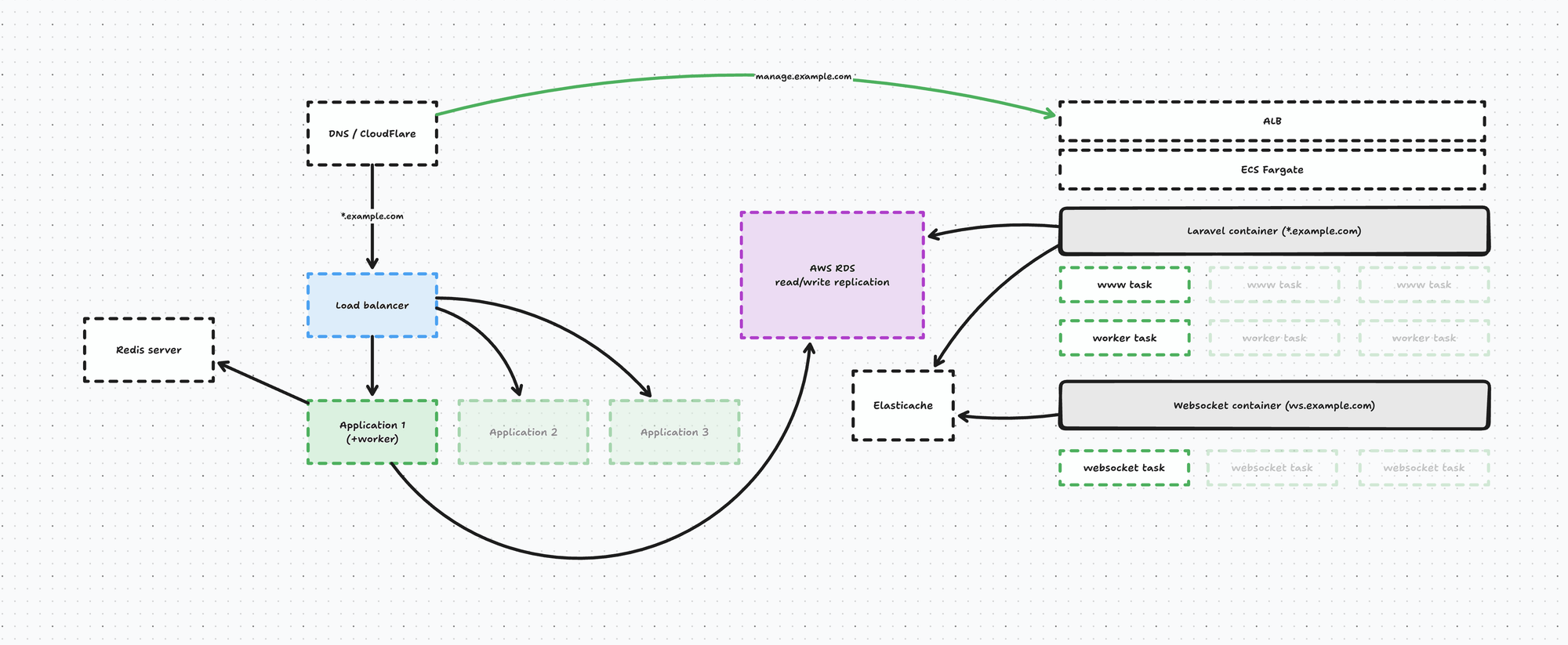
On the AWS side of things we set up an infrastructure that looks a little something like this:
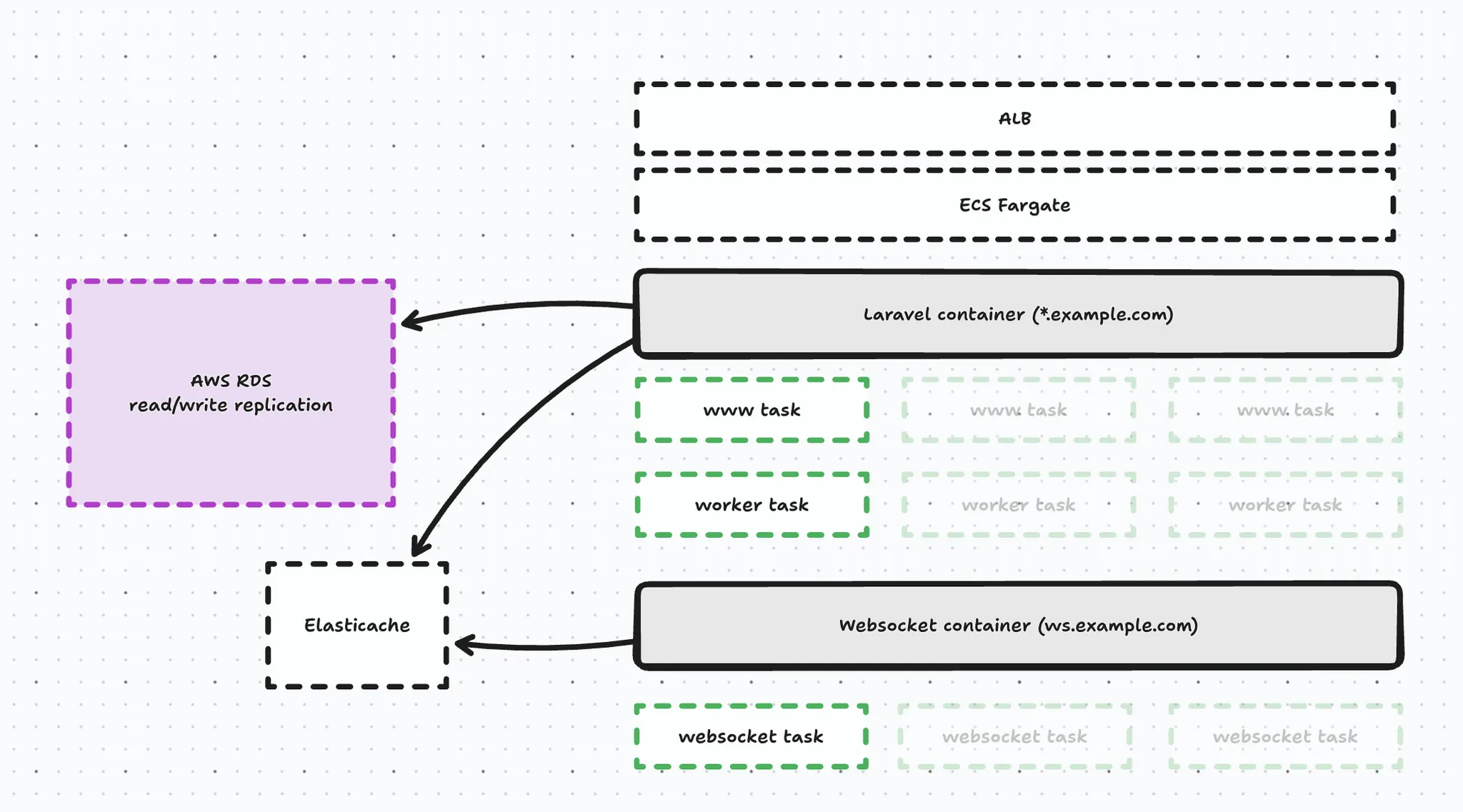
At the core we have an ECS Fargate cluster that with 3 services:
- Our web service handle web traffic
- Our worker runs Horizon & cron
- And our websocket service runs Laravel Echo Server
Both the worker and the web service share the exact same Docker image and simply have a different boot configuration (technically, a different supervisor config). The web service starts FPM, Nginx etc. - while the worker starts horizon and runs cron. Our websocket service is built using a separate, Laravel Echo Docker image.
Containerization was one of the bigger challenges, because our application was not containerized at all. Previously when we deployed we just SSH’ed into the application servers pulled the code and be done with it. Locally I developed with Laravel Valet (and I still do).
I was able to postpone containerizing our application for long enough, and I finally had to cave so our ECS Fargate services could benefit from things like autoscaling. Upgrading PHP versions would also be much easier using containers.
The containerization process was not too bad in hindsight, but as a Docker noob this was quite challenging in the beginning. An additional layer of complexity was the fact I use a Mac with an Apple Silicon CPU, while the ECS task needs linux/amd64 images.
In order to make deploying more efficient, we created a base PHP image that contains all the extensions for our Laravel app to work. Building this base image takes ~45 minutes on a GitHub action. And on deploy we build our actual application image (based on the base image) that Fargate is able to use for the services.
The downside of this is that deploy time increased from 2-3 minutes to around 5 minutes, which is a compromise I had to make. We also finally created a GitHub action that is able to deploy our application. We have a separate GitHub action for deploying our websocket service because that doesn’t update too often (this will be important later on in the article).
In another post I might dive into the entire docker setup, but for now let’s move on with the infrastructure.
On top of our ECS Cluster we have an an Application Load Balancer taking care of routing requests to our ECS fargate services, and we distinguish 2 requests:
- wildcard request hits the web service → *.example.com
- meaning our webshops, management panel and api
- websocket request hits the websocket service → ws.example.com
This entire infrastructure is managed in code using Terraform, which makes it pretty easy to manage the seperate components and tie them together.
Migrating the websocket
At this point we’re running 2 separate instances of our application. We have the live application running on our current server provider - and we have the ECS cluster up and running.
Now it’s time to start the migration process and the first component I wanted to migrate was the websocket.
Let’s first take a look first at how we broadcast events in our Laravel app.
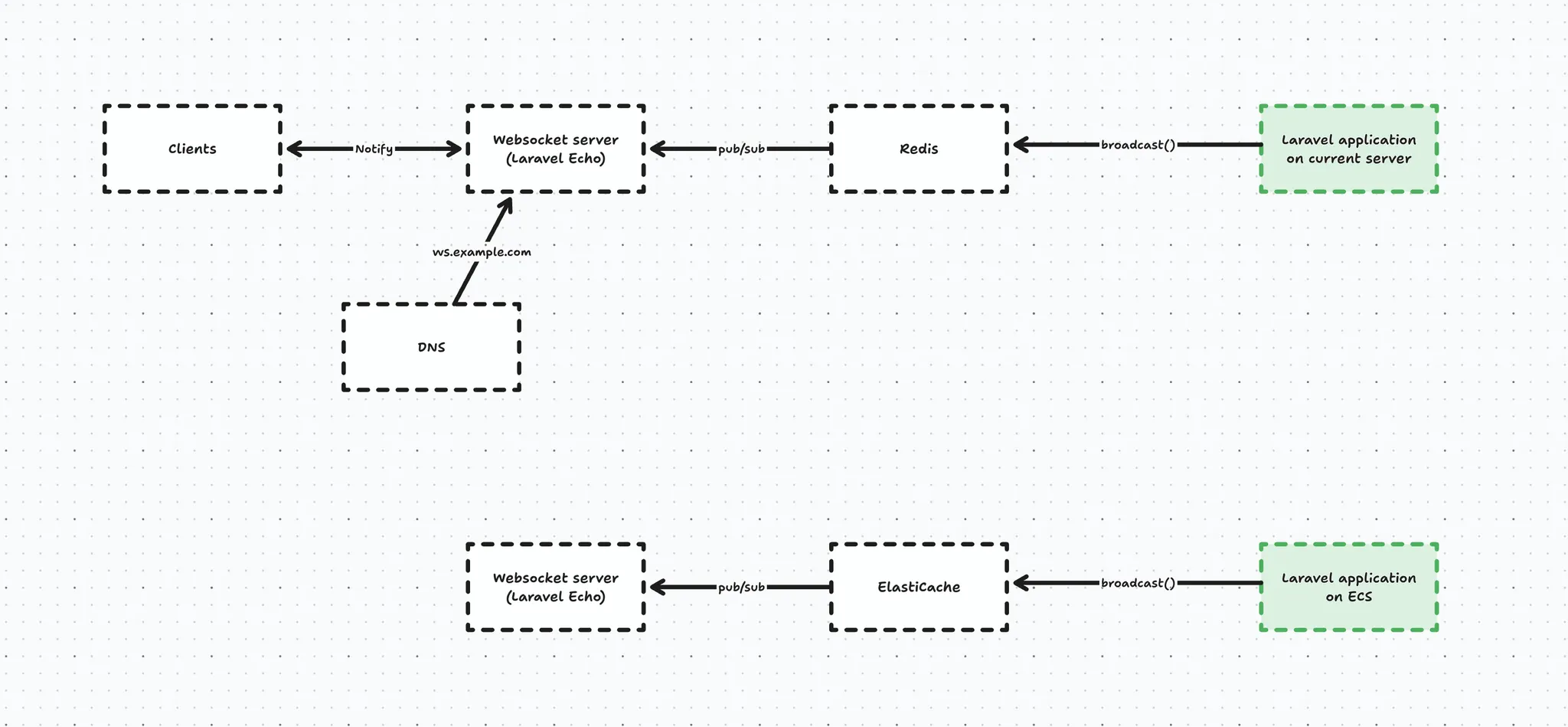
Whenever our live Laravel app broadcasts an event, it ends up in Redis, which will notify the websocket server (Laravel Echo), which in turn will notify the connected clients who are interested in said event → for example OrderPlaced.
And the same happens from our new Laravel application on ECS, except the events end up in the other instance of Echo Server, which does not have clients connected to it.
Looking at the schematic above you immediately see there is no connection between the 2 running applications, which is an issue.
Initially, we explored sharing a Redis instance for broadcasting purposes. But, Redis is a bit special in that sense that it is not recommended to expose it to the internet (and Elasticache simply does not allow it, period). That’s why we abandoned this route entirely (I’ll spare you the details of the SSH proxy jumping we tried 😅)
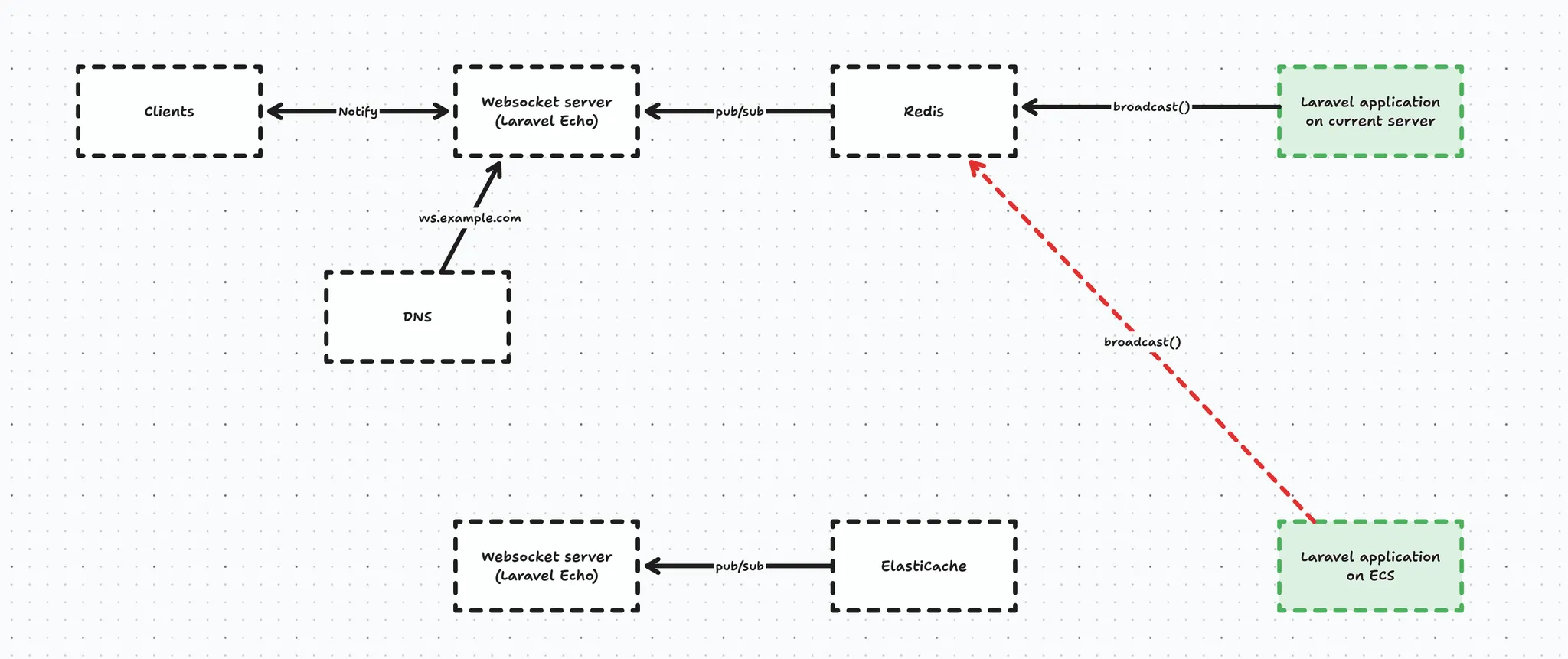
Lucky for us, Laravel Echo Server has a way to expose an HTTP API, so instead of broadcasting through Redis, we are able to broadcast using an HTTP POST request to the API. For this purpose we created a custom HTTP Laravel broadcast driver.
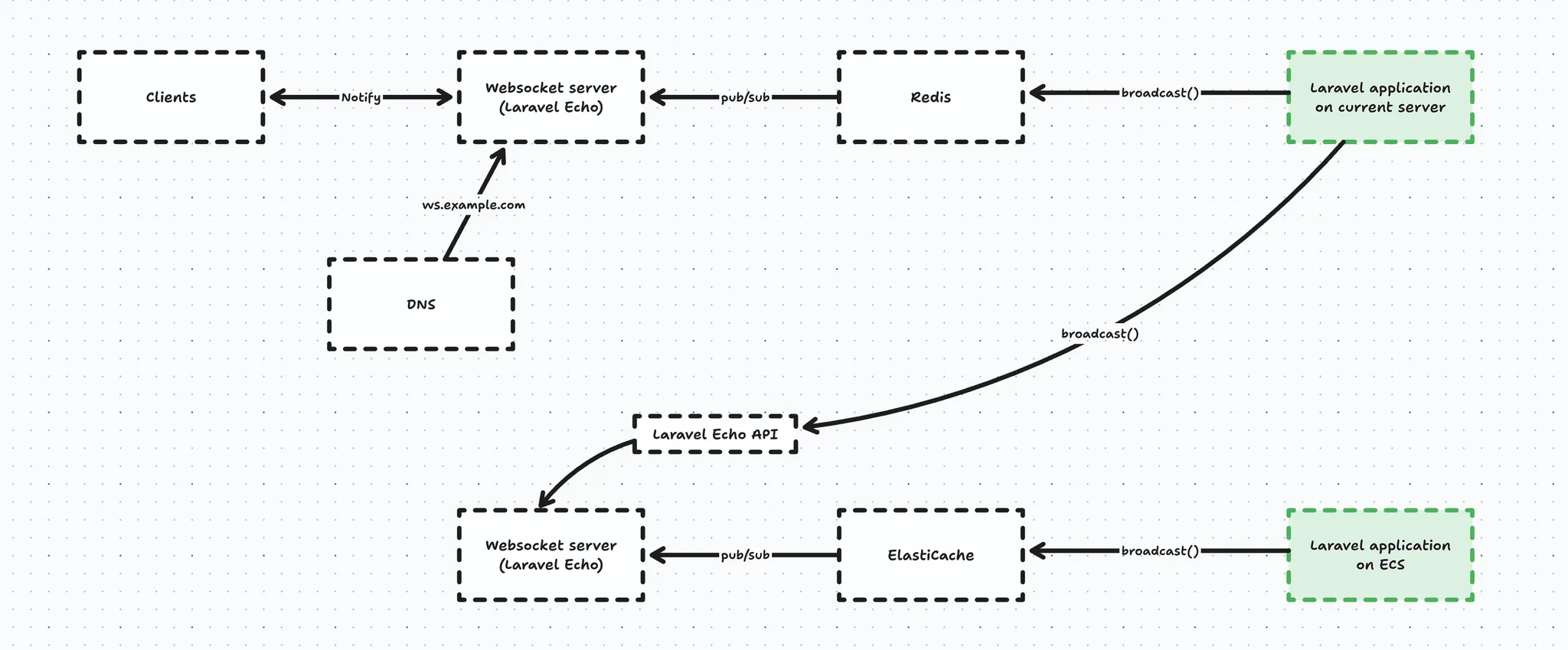
And broadcasting also still needs to happen to the original Laravel Echo server, because here’s the thing - once a client connects to a WebSocket server, it doesn’t reconnect on every message, it keeps a persistent TCP connection open. That means that if we were to change the DNS record to point to the new server, clients won’t magically follow it. So in an effort to not cause any impact we broadcast the event twice in anticipation of our DNS record change.
For this purpose we created a ‘multibroadcast’ broadcast driver that was able to broadcast the same event multiple on multiple drivers (once in Redis, and once over HTTP).
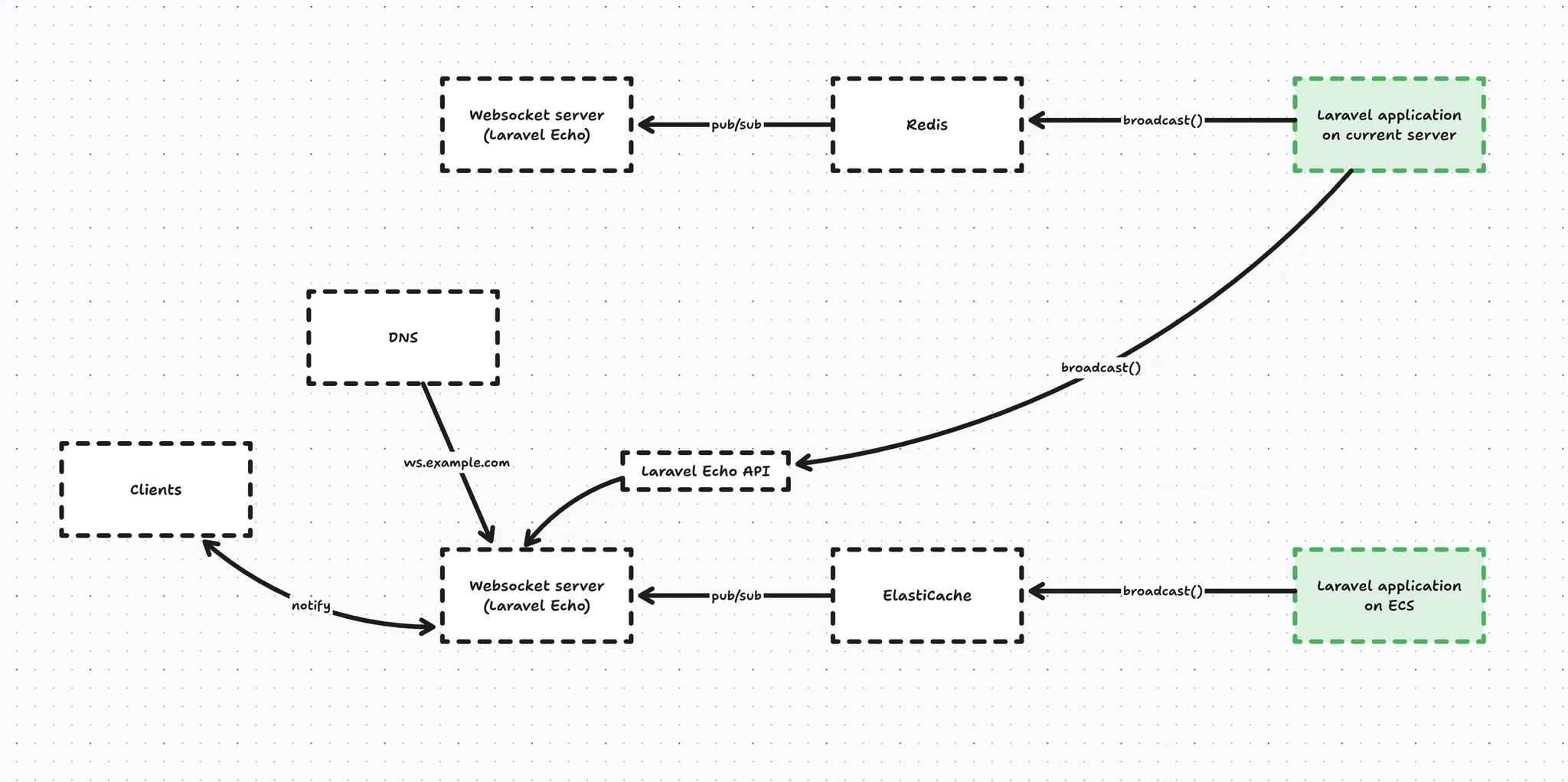
So, once we flip the DNS record clients are also able to connect to the new Websocket server on ECS.
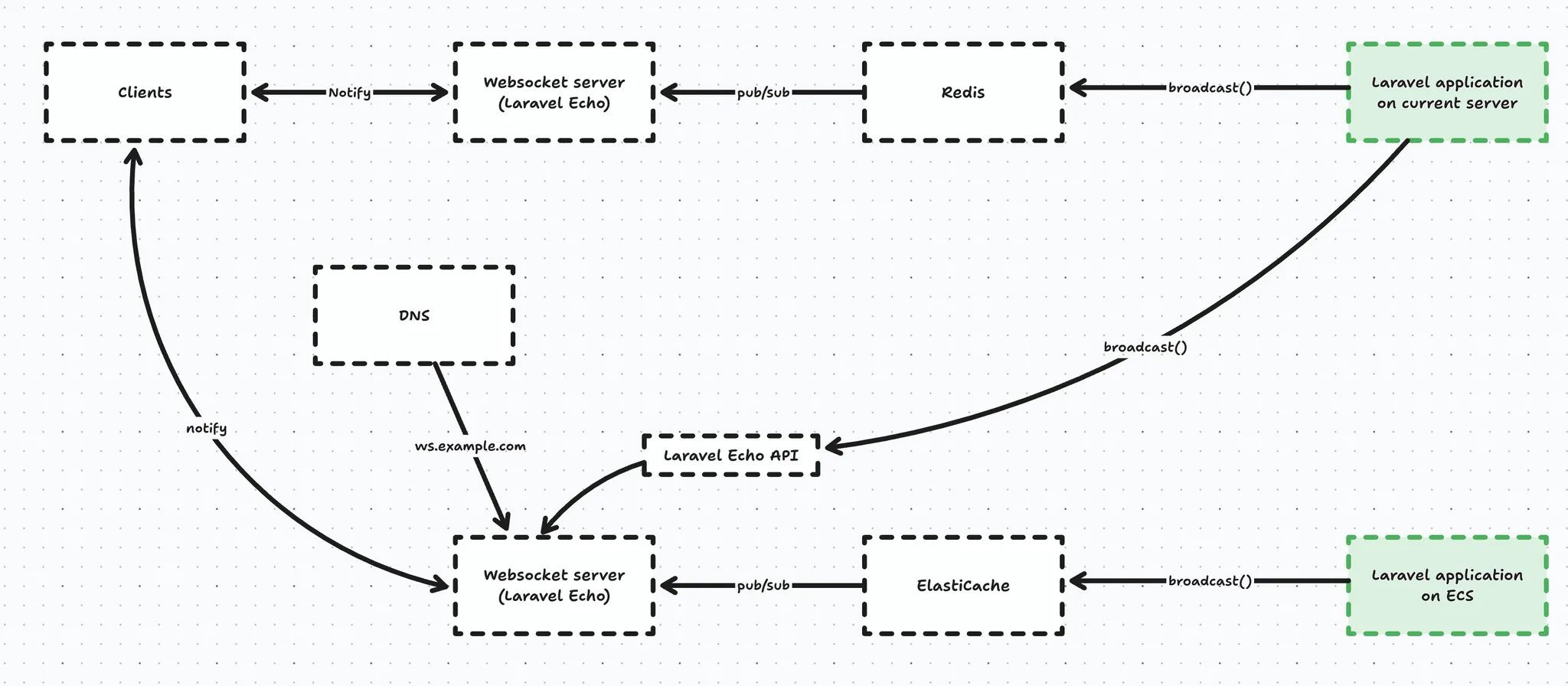
At this point, we were at the mercy of DNS propagation as you can see in the graph below. This graph illustrates the active connections to the legacy websocket server after the DNS change:

After we were sure the DNS propagated enough, we had to have a way to force the remaining clients to reconnect to the new server. Lucky for us this was actually super simple to do - we could just turn off the legacy websocket server and all of our clients still connected to that one were forced into a reconnect flow - which comes for free with Laravel Echo client - and this forced them to do a new DNS lookup and eventually connect to the new websocket service on ECS.
This migration went super smooth and not a single customer experienced impact here.
Unfortunately - during a routine maintenance event on ECS our websocket service failed to restart and caused downtime that went unnoticed for about half a day (!).
The reason for this was actually entirely my fault.
- We did not monitor our websocket endpoints - rookie mistake, lessons learned
- The actual reason why ECS was not able to restart the service was because the container registry pruned the websocket image. I did not create a separate registry for the websocket images and because we deploy the application often, the websocket image got pruned*. Lessons learned - don’t be lazy and just create that separate registry for the websockets.
* Initially the websocket server also used the same Docker image because we explored migrating to Reverb. On every deploy, we also updated the Websocket ECS tasks, but after we split the Websocket image from the application image, we also split the GitHub action, not realising we had set the incident in motion at that moment. We split the Websocket image because migrating to Reverb meant updating all our clients, which we ultimately decided against at this point in time.
Luckily the impact was minimal because all of our clients have a fallback to polling when they can’t connect to the websocket server.
Alright - now that we have our websockets on ECS, let’s move on to the actual application.
Migrating the application
Migrating the application was a diffent beast because we experience high volume and our merchants expect us to have high availability during those peak moments.
Now, luckily we didn’t have to migrate everything in one go. If we take a look at the wildcard domain *.example.com, this actually contains:
- all the webshops (eg. merchant-1.example.com, merchant-2.example.com, …)
- our API endpoints that our POS and kiosk use (api.example.com)
- our management interface (manage.example.com)
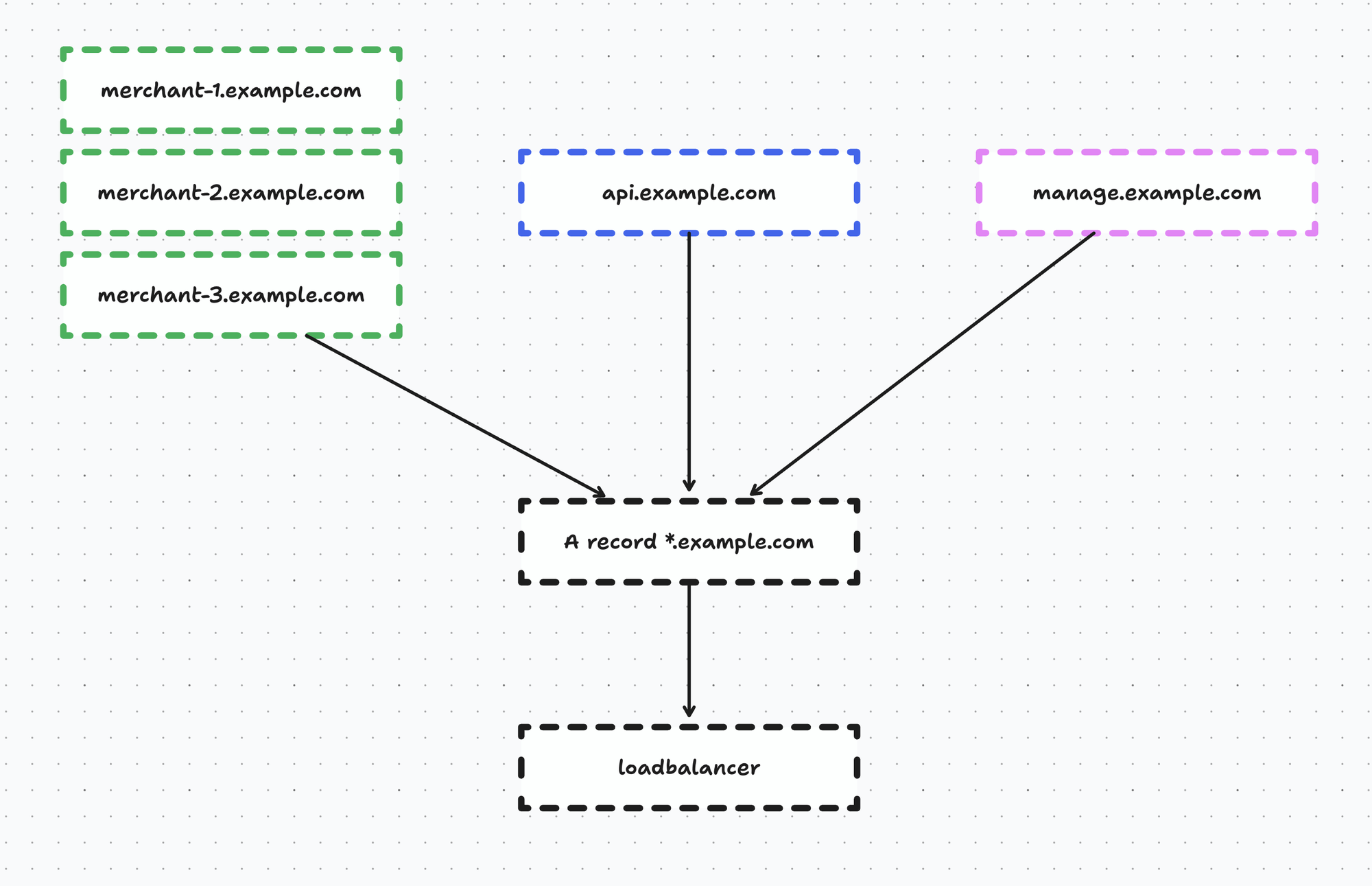
We chose to migrate the management interface first because if something were to go wrong here it’s not too critical as long as the webshops and POS keep working.
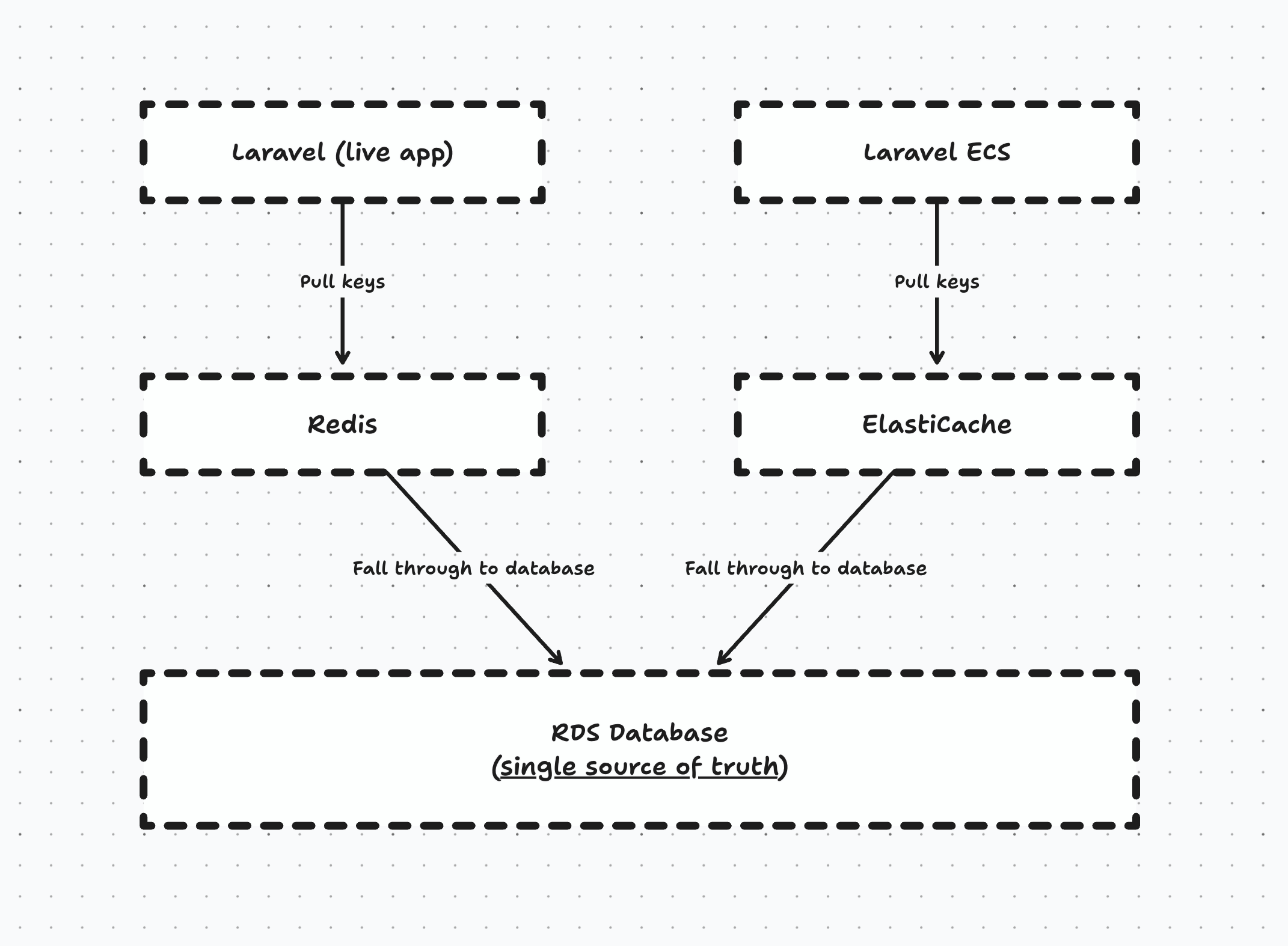
Now, we had to make a few application-level adjustments before we could simply switch the DNS record over. For example, we stored a few things exclusively in Redis - this was a bad decision at the time, I know, but we had to deal with it. We made sure that our application would stop abusing the cache driver, and start using it as intended - namely, a cache driver and not a persistent store.
After we made these few adjustments it was time to switch over the DNS record of the management interface and… this actually all went fine. There was zero impact and our merchants did not even notice a single thing.
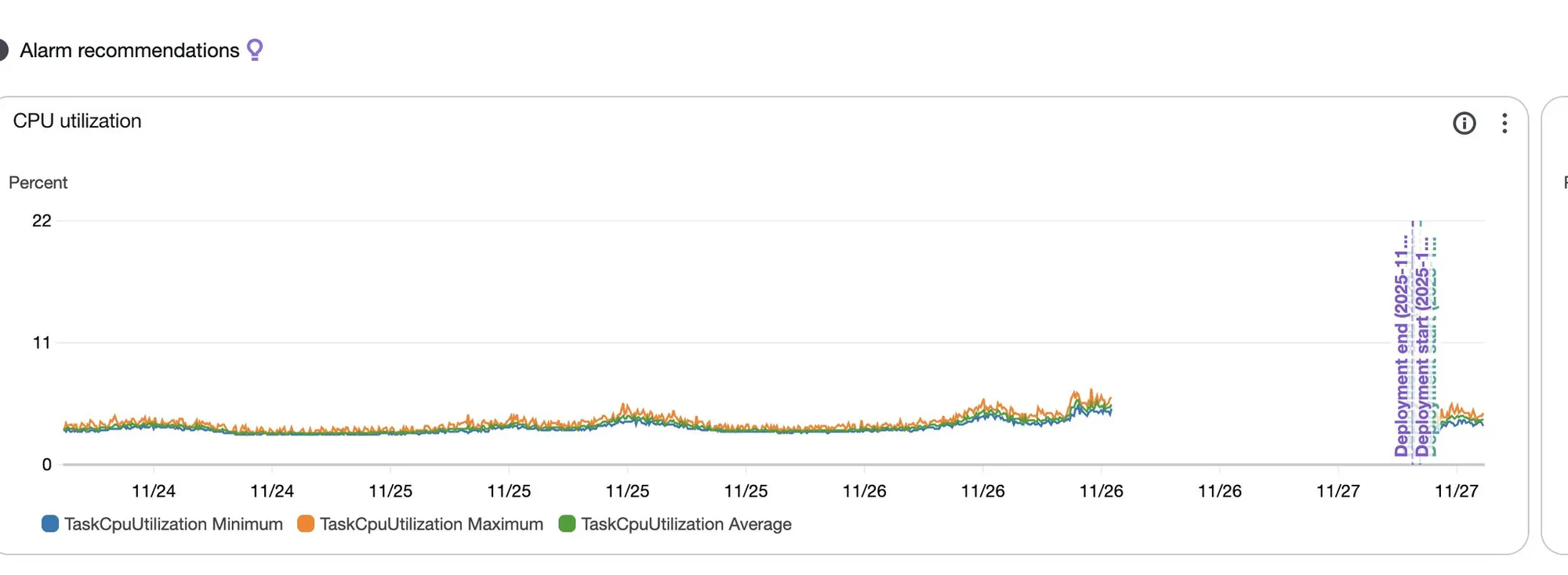
The ECS service was able to handle things pretty well because the tasks were massively overprovisioned initially. We then started tuning the task CPU and memory and we tweaked the autoscaler so when there was high load it could scale out automatically.
Currently we use 2vCPU on 4GB ram per task, but we’re still observing a lot so this might get scaled down further.
Finally, we also made sure the task scheduler was migrated and horizon was started as well. We didn’t use horizon on the old infrastructure because we used the database driver, so that actually works out fine for us because jobs dispatched on the old infrastructure would still be processed over there and jobs dispatched on the ECS infrastructure would be processed by Horizon.
Once we were comfortable with the way the service behaved and autoscaled, we started migrating the API which went very smooth as well.
And then came the webshops. We have ~2k webshops which I didn’t want to do in a big bang, so I developed a nice script that allowed me to create DNS records in CloudFlare for a subset of merchants, something like:
<?php

namespace App\Console\Commands;

use App\Jobs\DisableCloudFlare;
use App\Jobs\EnableCloudFlare;
use Illuminate\Console\Command;

class MigrateToECSCommand extends Command
{
    /**
     * The name and signature of the console command.
     *
     * @var string
     */
    protected $signature = 'migrate-to-ecs {percentage} {--enable} {--disable}';

    /**
     * The console command description.
     *
     * @var string
     */
    protected $description = 'Automatically migrate a set of domains to ECS by managing Cloudflare DNS CNAME records pointing to ecs.example.com';

    /**
     * Execute the console command.
     *
     * @return int
     */
    public function handle()
    {
		    // Get an array of domains, eg ['merchant-1.example.com', 'merchant-2.example.com']
        $domains = getPercentageOfDomains($this->option('enable'));
        $enable = $this->option('enable');
        $disable = $this->option('disable');

        if (!$enable && !$disable) {
            $this->error('Please specify either --enable or --disable option.');
            return Command::FAILURE;
        }

        if ($enable && $disable) {
            $this->error('Cannot use both --enable and --disable options.');
            return Command::FAILURE;
        }

        $apiToken = config('services.cloudflare.api_token');
        $zoneId = config('services.cloudflare.zone_id');

        if (!$apiToken || !$zoneId) {
            $this->error('Cloudflare API credentials not configured. Please set CLOUDFLARE_API_TOKEN and CLOUDFLARE_ZONE_ID in .env');
            return Command::FAILURE;
        }

        if (empty($domains)) {
            $this->error('No valid domains provided.');
            return Command::FAILURE;
        }

        $this->info('Processing ' . count($domains) . ' domain(s)...');

        foreach ($domains as $domain) {
            try {
                $this->info("\nProcessing: {$domain}");

                if ($enable) {
                    dispatch(new EnableCloudFlare($domain));
                } else {
                    dispatch(new DisableCloudFlare($domain));
                }
            } catch (\Exception $e) {
                $this->error("Error processing {$domain}: " . $e->getMessage());
            }
        }
    }
}
And the jobs do an HTTP request to the CloudFlare API to create / delete the DNS record:
$existingRecord = $this->findDnsRecord($subdomain, $apiToken, $zoneId);

if ($existingRecord) {
    \Log::info("DNS record for {$domain} already exists.");
    return;
}

// Create new CNAME record
$response = Http::withToken($apiToken)->post(
    "https://api.cloudflare.com/client/v4/zones/{$zoneId}/dns_records",
    [
        'type' => 'CNAME',
        'name' => $subdomain,
        'content' => 'ecs.example.com',
        'ttl' => 1, // Auto TTL
        'proxied' => true
    ]
);

// Delete the record
$response = Http::withToken($apiToken)->delete(
    "https://api.cloudflare.com/client/v4/zones/{$zoneId}/dns_records/{$existingRecord['id']}"
);
Every monday for a few weeks I migrated over a percentage of webshops until there were no more left, and I was able to update our wildcard DNS record in CloudFlare and clean up all the records that were created.
So everyone was reaching our new infrastructure at this point, and we could safely deprecate our old infrastructure.
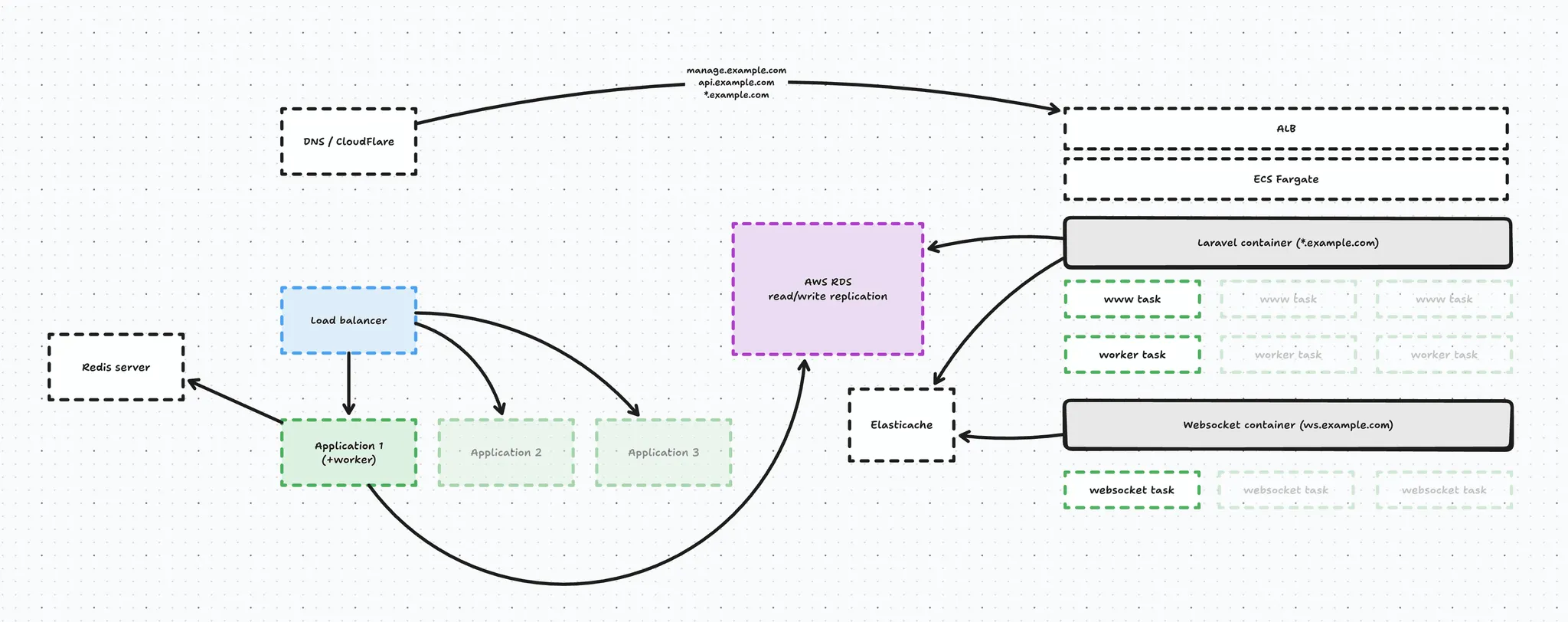
This also went by without any issue, so overall I am very happy with how things went and we can finally say we are freed from our previous infrastructure provider.
(auto)scaling
We obviously configured autoscaling on ECS using a set of alarms, for example when the CPU or memory hit a consistent 70% - which is pretty conservative - add a new task.
This happens for every service, so:
- if our worker suddenly gets flooded with jobs, it will scale
- if our traffic spikes our web service will scale
- and if we hit our websocket limits our websocket service will scale
All automatically, freeing me of having to worry about infrastructure, which is great. 🎉
But the thing is, our traffic pattern is very predictable we have a spike at lunch and dinner, and it is more agressive on fridays and in the weekends. During the night we virtually have no traffic.
In addition to autoscaling, I created a Laravel command that is able to proactively scale our application by updating the minimum capacity required in ECS. This works in addition to autoscaling and allows me to finetune the control I have over the infrastructure.
I schedule this command a few times:
- at night the minimum capcity scales down to 1 to save costs
- during the day we scale up to 3 minimum
- on fridays we go for 6 in the afternoon
// Scale down to save costs
$schedule->command('ecs:set-min-capacity www 1 --force')
    ->timezone('Europe/Brussels')
    ->dailyAt('00:30')
    ->withoutOverlapping();

// Scale up for peak performance
$schedule->command('ecs:set-min-capacity www 3 --force')
    ->timezone('Europe/Brussels')
    ->dailyAt('09:00')
    ->withoutOverlapping();

// Prepare for high load
$schedule->command('ecs:set-min-capacity www 6 --force')
    ->timezone('Europe/Brussels')
    ->fridays()
    ->at('14:00')
    ->withoutOverlapping();
And this really works great and will allow the infrastructure to be better prepared for load during the day.
The command itself just logs in to ECS and updates the min capacity.
$cluster = 'my-cluster';
$service = $this->argument('service');

$client = new ApplicationAutoScalingClient([
    'region'      => config('services.ecs.region', 'eu-central-1'),
    'version'     => 'latest',
    'credentials' => [
        'key'    => config('services.ecs.key'),
        'secret' => config('services.ecs.secret'),
    ],
]);

$client->registerScalableTarget([
    'ServiceNamespace'   => 'ecs',
    'ResourceId'         => "service/{$cluster}/{$service}",
    'ScalableDimension'  => 'ecs:service:DesiredCount',

    // Only updating MinCapacity. MaxCapacity and DesiredCapacity stays untouched.
    'MinCapacity'        => $minCapacity,
]);
And that concludes our migration. The past few months have been quite the adventure and I learned a lot while migrating my project to ECS and containerizing it.
If you found this article insightful, consider subscribing to the occasional newsletter and to my YouTube channel.
No spam, no sharing to third party. Only you and me.